Architecture and data model#
Showroom is part of a potential ensemble of applications, that are used to display current art and research information from several institutions’ repositories.
In its most simple setup, Showroom will be combined with a single Portfolio instance, and a CAS/UserPreferences instance to provide entity data. But it could also be used to only display the activities that are published from Portfolio, without including any detailed data about the users/publishers of those activites. In that case a single Showroom can be combined with a single Portfolio instance, and the user repository can be disabled in the configuration.
However, Showroom is built in a way to accommodate different Portfolio instances as repositories, and in hindsight of adding adapters for other CRIS or object repositories in the future. This is one of the main reasons why Showroom does not just mirror tha data model used in Portfolio.
The following subsections aim to shed some light on the architectural decisions in this project and how data is handled and transformed.
The basic architecture#
In the following diagram you see a macro perspective on Showroom and how it is connected to other components. A detailed explanation follows below.
 (full-size image:
 showroom-backend-architecture.png
drawio source: showroom-backend-architecture.drawio)

The Showroom Backend setup consists of the following components all running in their own docker containers:
Django application (might also be run on the developers host, ideally using a python virtual environment. More on that in the Installation guide section.)
PostgreSQL database - storing the data
Redis store - caching and message queuing
The backend provides a REST API, which is described in more detail in REST API. It provides public and authenticated endpoints for the frontend, as well as endpoints with an API key based authentication for repositories to push data to Showroom.
A central component of Showroom is the Portfolio adapter, which is responsible for:
handling all data transformations for entry data that is published in Portfolio
generating all relevant search indices, that are used in the search.
For more information on the data model see the corresponding section below. For more details on the search functionality go to Search logic.
Apart from the Showroom Backend there is of course also a Showroom Frontend, which:
is a server-side rendered application written with Nuxt.js and Vue.js
displays all public information to Showroom visitors
allows logged in users to edit their own descriptin, showcases and activity list ordering
allows logged in users to edit other entities, if configured
Additionally, the backend still provides the classic Django admin for administration and mostly development and debugging convenience.
To get actual data into Showroom we need a repository, that uses the
repo endpoints, to push published entries. In this basic setup we have:
a single base Portfolio instance, that pushes entries to Showroom, whenever they are published by its users
an authentication backend, that also provides information about the users/publishers - as long as they have activated their Showroom page
This can also be called the user repository, which in our basic setup is a single instance of base CAS with the User Preferences module, that has been added in 1.1.
While in the described case there is only a single data and a single user repository, there could be more repositories connected to Showroom. This is elaborated in the next section.
Finally, there is a controlled vocabulary in form of a Skosmos instance. This is used by Showroom (as well as by Portfolio) to provide localized labels for a range of concepts described in the data.
Ecosystem architecture#
The following diagram shows the potential application of Showroom in a multi-instance and multi-stakeholder data ecosystem.
 (full-size image:
 showroom-ecosystem-architecture.drawio.png
drawio source: showroom-ecosystem-architecture.drawio)

In contrast to what we have seen in the former section on the basic architecture, here we see how different repositories are connected to a Showroom Backend instance, who can all push data, that was published by their users. While currently this is already possible with different Portfolio instances, the adoption of different CRIS or other data repositories would require the development of a corresponding adapter.
Note: while Showroom Backend is developed with hindsight to other potential repo adapters, currently we still would need to refactor some significant parts of the backend code, to have a fully modularized version, where repo adapters can be interchanged by a mere configuration directive and the use of a corresponding module.
Similar to several data repositories, Showroom could also accommodate for different user repositories / authentication backends. Similar to the idea of repo adapters, this is still an abstract concept and would require implementation in a later version.
The user in the end should be able to access a Showroom instance through different frontends. This allows for different institutions to use the same Showroom infrastructure, while still providing a customized or branded user experience to its own user base. Additionally, their can be joint platforms showcasing the activities of several institutions in one place.
Showroom objects, and the data model#
Showroom combines data from published entries in data repositories as well as data from user repositories, if users have activated their Showroom page. These should be presented in similar user interface structures and also searchable in mostly similar ways. In addition to what comes in from the repositories, it is also planned to add albums as another type of Showroom object, which is solely maintained by the users within Showroom. Similarly, users can already maintain their biographic data and a showcase for their user page within Showroom.
These are the guiding considerations for the design of the Showroom data model, which will be explained in a bit more detail in this section.
Showroom contains the following entities, implemented as Django models:
SourceRepository: a representation of an institution’s repository, including the API key used by the repository to authenticate.ShowroomObject: any object in Showroom that can be displayed on a distinct page. So far this contains entities (persons, departements and insitutions) and activities (the entries published in the repository). In the future albums will be a different kind of ShowroomObject.EntityDetail: contains aggregated data only for ShowroomObjects of an entity typeActivityDetail: contains aggergated data only for ShowroomObjects that are activitiesMedia: stores metadata about media that are associated with a ShowroomObject (usually an activity). The media files themselves are not stored in Showroom, only the links to the publicly consumable media in the SourceRepository.
Further, the following (explicit) Django models are used to manage relationships between ShowroomObjects or to create search indices:
Relation
ContributorActivityRelations
TextSearchIndex
DateSearchIndex
DateRangeSearchIndex
DateRelevanceIndex
The following diagram displays those core models (with a green box color), as well as the available endpoints in the API (with a light magenta-ish box color) and all the elaborated data formats (with a light violet box color), that are used by the API, or by some object properties to store information. Additionally the elaborated data formats in the diagram display the relations between actual core model data and what the clients get through the API.
 (full-size image:
 showroom-model-classes.png
drawio source: showroom-model-classes.drawio)
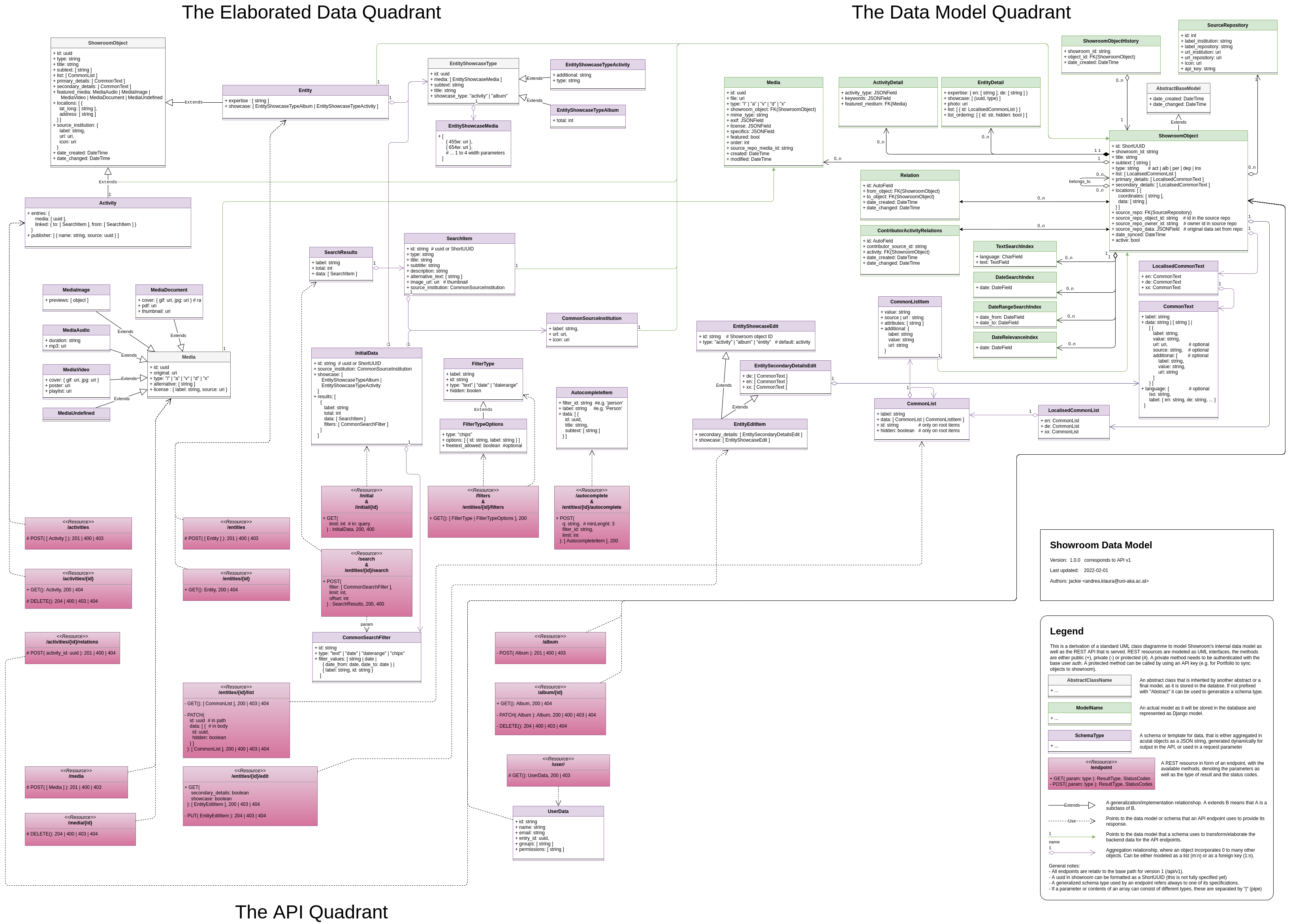
What this model does not show are the transformations from an activity’s source data format in the repository (e.g. as it is stored in Portfolio) to how it is stored in Showroom. This will be elaborated in the next section.
Data transformations#
When a repository pushes one of its entries to Showroom, it has to be transformed into
a ShowroomObject of the type activity. In Showroom all published entries from
repositories are framed as activities which belong to a user, which is linked in
the activities, if they also have activated their Showroom user page. Those activities
then fall into different categories, like “document/publication”, “exhibition”, “audio”,
“research project”, or one of the many more available categories.
Depending on which category this activity falls into, it should be displayed differently in Showroom.
While the Showroom Frontend is finally responsible for displaying the results, the Showroom Backend is responsible for already preparing the data to be displayed, so that that most of the needed transformations are done already on creation/update of an activity, and the data is ready for the response, whenever a client requests the activity.
So, while the original data from the repository will be stored on the ShowroomObject
in the source_repo_data property, the following properties should already hold the
data as it is displayed by the Showroom Frontend:
titlesubtextprimary_detailssecondary_detailslistlocations
The following subsections list which of the properties from the repository data should be transformed into which of those ShowroomObject properties, based on which category / activity type they fall in.
Below these sections we provide a bit more detail on how those transformations are supposed to work.
The following subsection explains how and why data coming from a repository has to be transformed in general. Depending on the specific category of entry, different fields have to be transformed and mapped. The specific mapping of data to those mentioned fields can be found in the Appendix section Data transformation definitions.
Details on how to transform data#
To shed some light on how the data will be displayed, the following screenshot of an activity in Showroom contains additional area markings in red, with the ShowroomObject properties, which are used by the Frontend to display the data:
 (full-size image:
 data_transformation_areas.png)
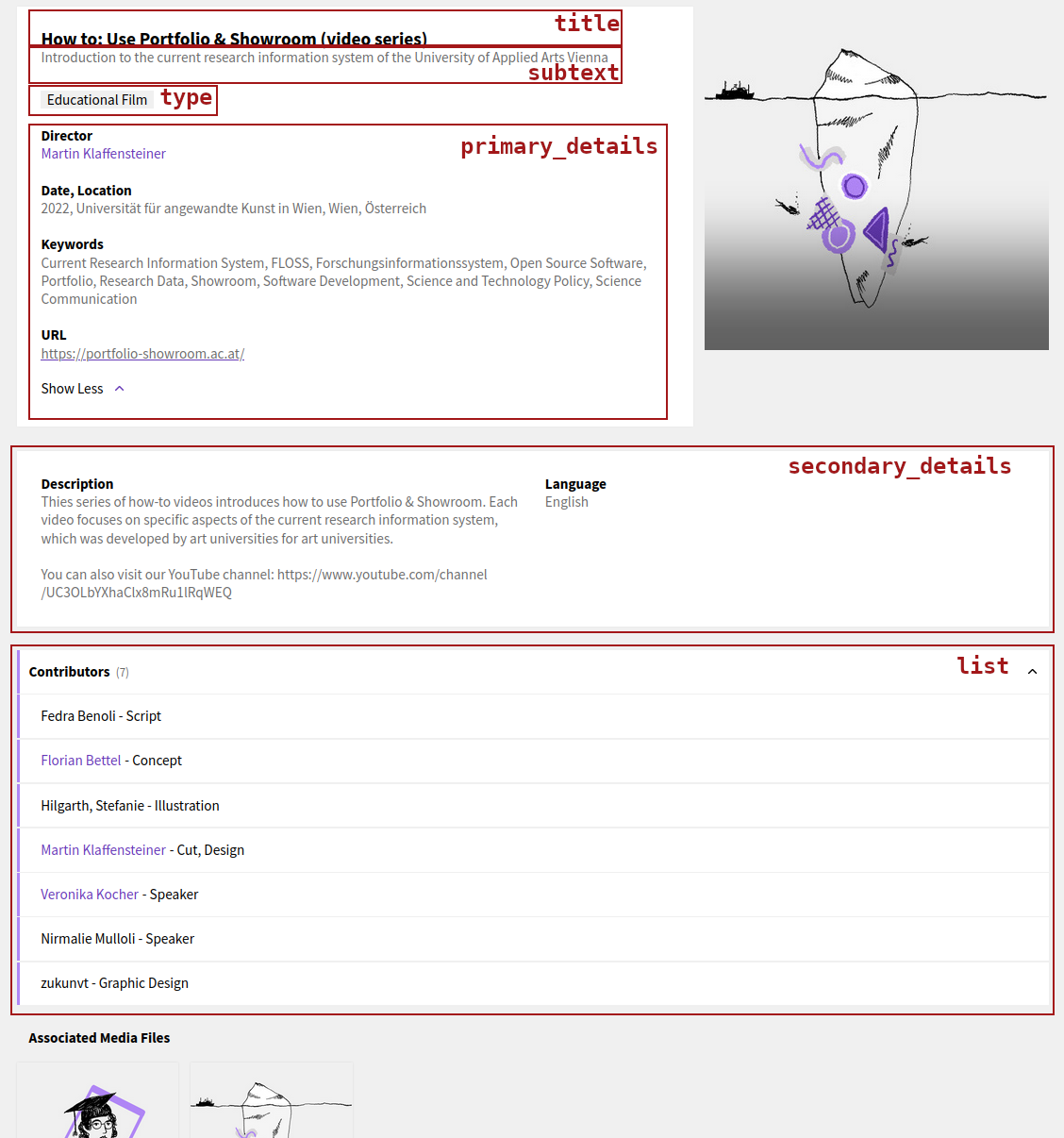
Here you also see, that the type is displayed in one area. But it is not mentioned
in the above transformation definitions. This is because the type contains the data
as it comes from Portfolio, and the Showroom Frontend uses a specific component to
display it.
What is missing from the above screenshot is how the location property will be
displayed. The next screenshot is from a different activity, containing two locations:
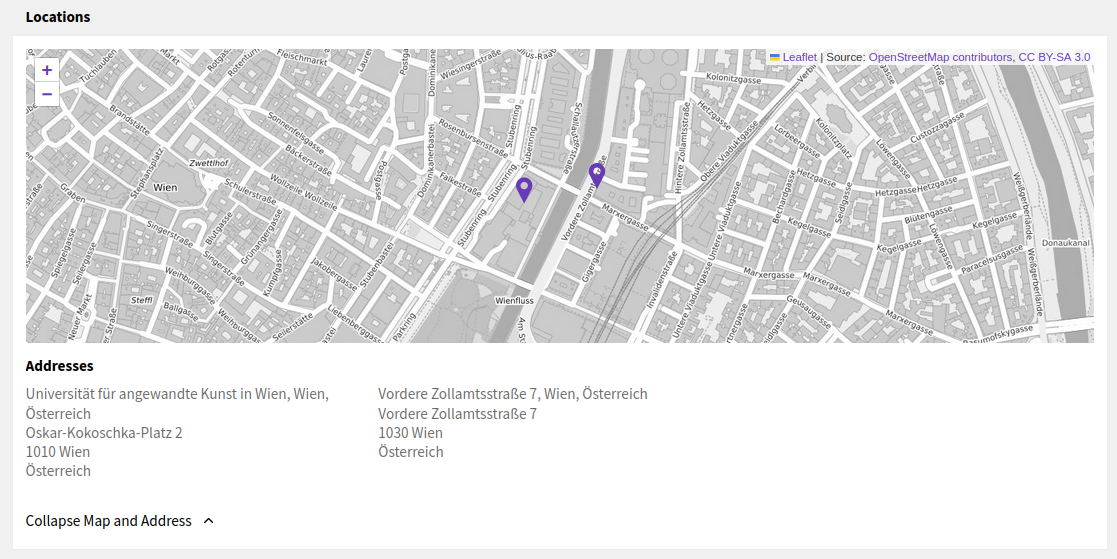 (full-size image:
 data_transformation_location.png)
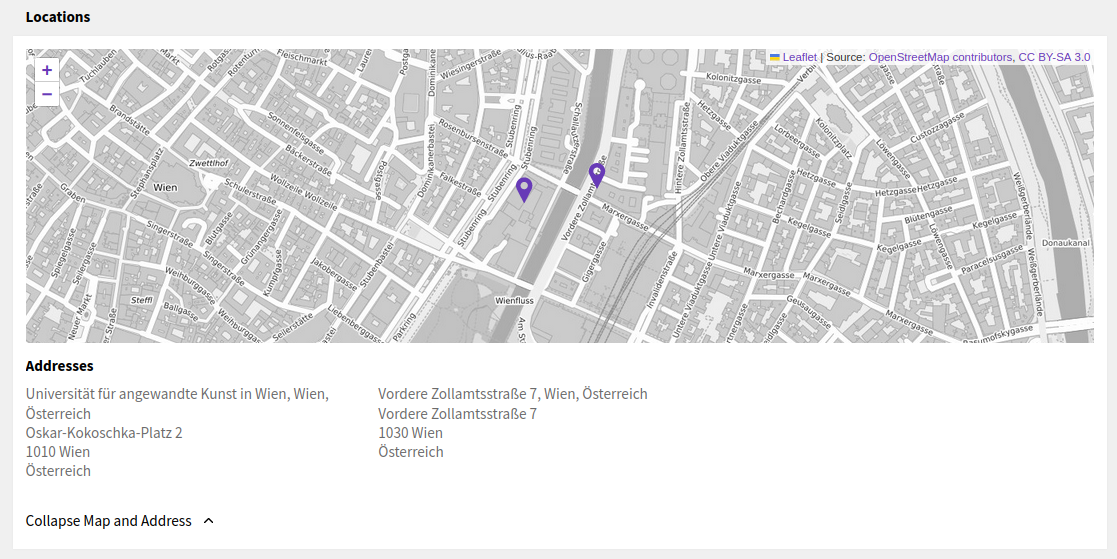
The location property is an array containing objects (for each location found in the
repository data). Each of the location objects contains a data property and a
coordinates property, both are arrays. The latter just holds two floating-point
numbers: the latitude and the longitude. These are used to display the markers on the
map. The data array contains a list of strings, which are used to display the
lines of each address below the map.
Now for the primary_details, secondary_details and list, we need the data in a way
that can be displayed easily by the frontend without the need for any additional
transformations or data mappings. To display this data the Showroom Frontend uses the
base-ui-components. There is a
Base UI Components styleguide
showcasing every component: how it looks like and how the data has to look like.
Both, the primary_details and the secondary_details are displayed with the
BaseTextList,
while the list is displayed with the
BaseExpandList.
These are the templates for how we need to provide data to the frontend, and in
consequence for how we already want to store it in the backend database.
The aim of Showroom Backend is to transform the repository data in a way, so we can store it almost exactly as the frontend needs the data in the ShowroomObject. But there is one catch: we need to localize the data for all available languages too. Yet the frontend will request the data only for a specific language. Therefore we transform all mapped items for every language and store them under specific language keys in each item of the property. When the frontend requests a an activity the backend only has to filter our the requested language before it returns the data.
The main implementation of this mapping and transformation for data coming from Portfolio happens in the following two files:
src/api/repositories/portfolio/transform.py
src/api/repositories/portfolio/mapping.py
When writing an adapter for a different repository, take those two examples as a template.
Data flow#
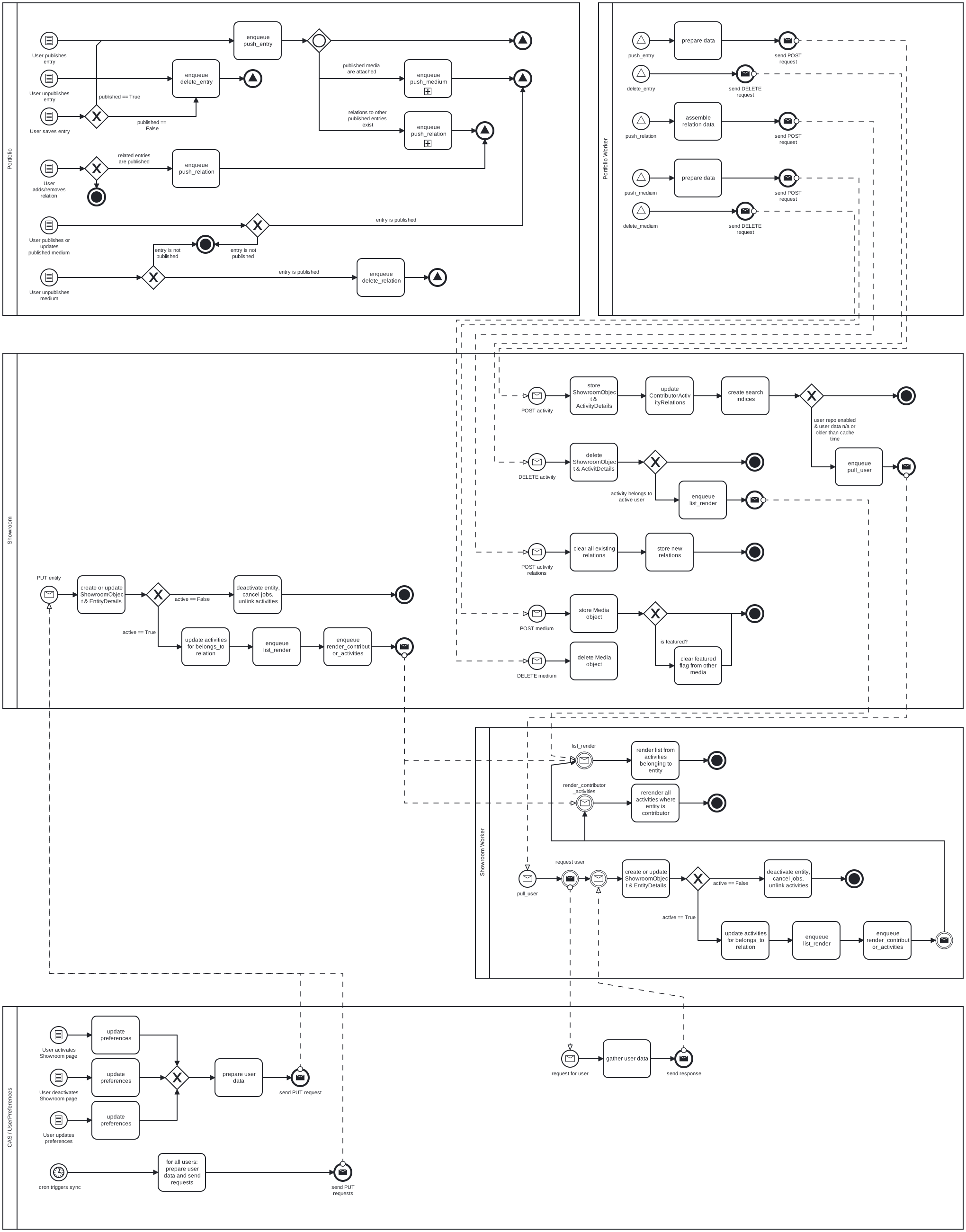
The following BPMN diagram shows the process (and data) flows, happening between the different components of the Portfolio/Showroom ecosystem. The aim here is not to describe any flows within a component, but give an overview of which actions in which components trigger which API calls and worker jobs, based on data that has to be (re-)rendered or in other ways processed.
Note that user interaction with Showroom Backend itself (through the Showroom Frontend), is not listed here. This is because all direct user interactions with Showroom should be able to be handled without interaction with other systems.
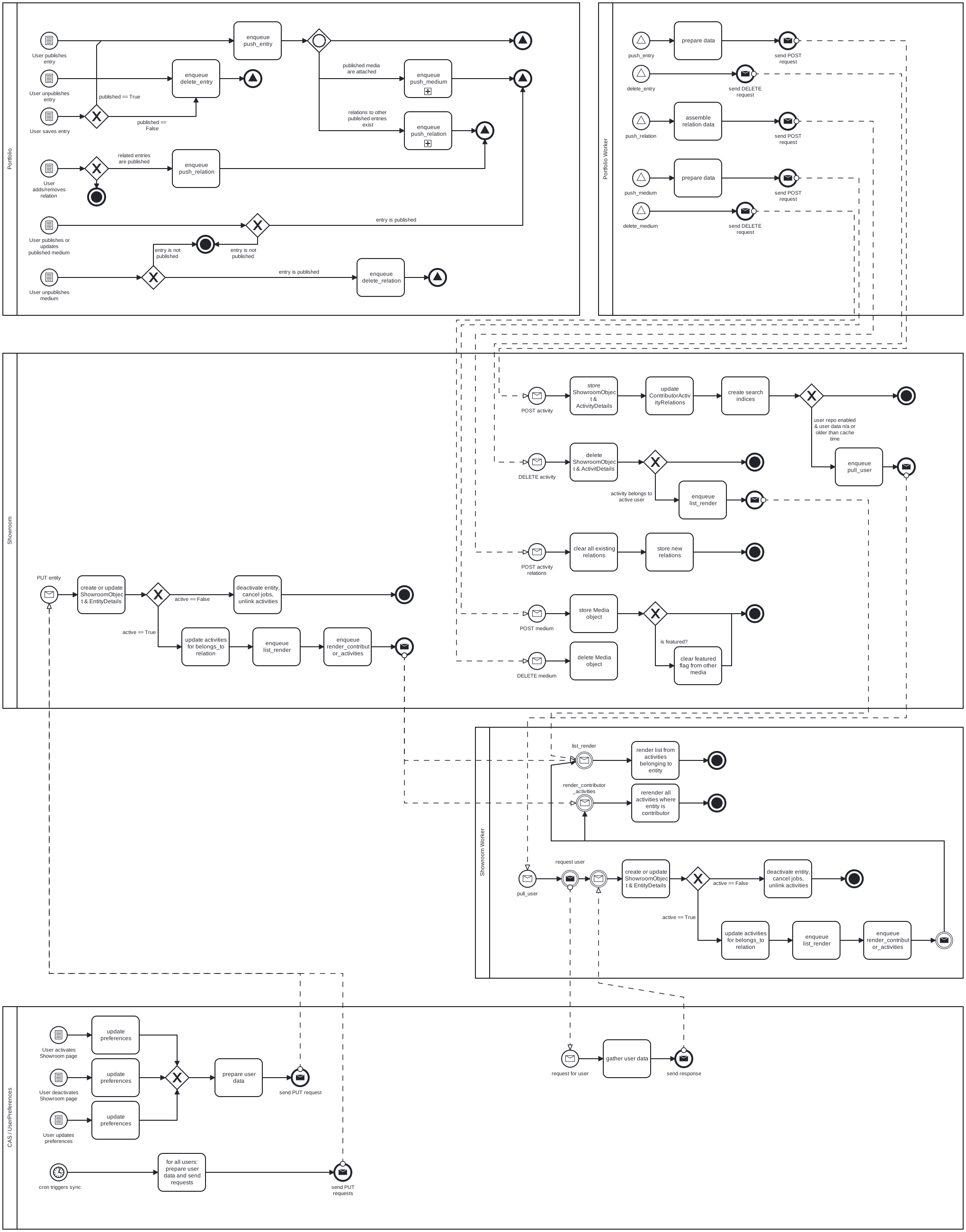 (full-size image:
 data_flow.svg
bpmn source: data_flow.bpmn)